
HP Original Toners

Compatible Toners
Potential Replacements
-
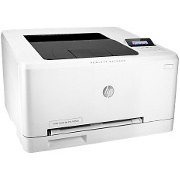
B4A21A HP Color Laserjet Pro M252n
Please email us to confirm availability
A4 Colour
LAN, USB
250 - 2,500 pages/month
2,800 page cartridge
-
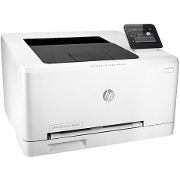
B4A22A HP Color Laserjet Pro M252dw
Please email us to confirm availability
A4 Colour
Automatic Duplex
LAN, USB, Wireless
250 - 2,500 pages/month
2,800 page cartridge
-
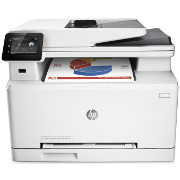
B3Q10A HP Color Laserjet Pro MFP M277n
Please email us to confirm availability
A4 Colour
LAN, USB
Fax, Scan/Copy
250 - 2,500 pages/month
2,800 page cartridge
-
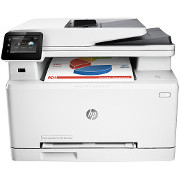
B3Q11A HP Color Laserjet Pro MFP M277dw
Please email us to confirm availability
A4 Colour
Automatic Duplex
LAN, USB, Wireless
Fax, Scan/Copy
250 - 2,500 pages/month
2,800 page cartridge
HP Color LaserJet 2605 Printer
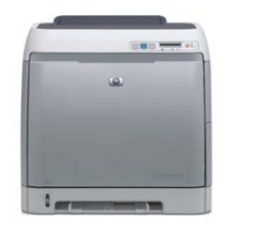
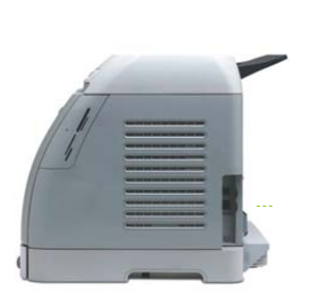
The Color LaserJet 2605 prints on A4 / letter sized paper at speeds of up to 12 pages per minute with resolution of 600 dpi and enhancement to ImageRet 2400.
Described as an affordable colour laser printer with a small footprint and quiet operation
. Other merits listed by HP are that it Easily fits into office environments. Creates professional documents for small businesses and home offices. Duplex print and photo printing via memory cards. Full print-language support with HP PCL 5e, HP PCL6 and an HP PostScript Level 3 emulation.
Today's assessment might be that the CLJ 2605 is probably both pleasing and annoying HP a bit, people are hanging on to them. HP gets the glory of another popular long-lasting product and the profit of cartridge sales; on the other hand they don't get to sell new printers. That is probably why Partsurfer now says This product (Q7821A) is no longer supported by HP as of May-15-2012, and service parts may not be available
. At the moment (July 2012) parts are available in UK distribution.
Printers in this family are several years old and not particularly cheap or easy to repair - or to run using HP original cartridges. However, despite some difficulty in remanufacturing, refills and compatibles can make this printer cost effective. A problem with the CLJ2605 is that the transfer belt and fuser are not very easy to change and do mean some screwdriver work -although the Service manual detailing the procedure is quite readily available.
The service manual is HP Color LaserJet 2605, 2605dn, 2605dtn
and the document number is Q7821-90930
(In 2012 Google gives 55 search results).
The user guide is part number Q7821â90906
. Google gave 153 results and 21 results for the PDF
In terms of specification newer printers like HP's CP1215 or the rather higher spec CP2025, M351a or M451dn are not that much better.
These printers were made between 2006 and 2008 (predecessor models CLJ 1600 and 2600 were 2005). The model is no longer in production but is still widely used.
Models are:
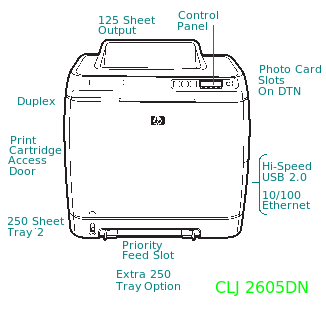
- Color LaserJet 2605 Printer -Q7821A - base model.
- Color LaserJet 2605dn Printer - Q7822A - duplex, network.
- Color LaserJet 2605dtn Printer - Q7823A - duplex, extra tray, network and memory-card printing
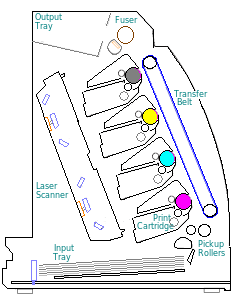
This laser printer uses an inline cartridge arrangement for relatively fast colour performance of 10 pages per minute.
The CLJ 2605 is a successor to HP's CLJ 1600 and 2600 models. The inline cartridge design used in this series gives fairly fast colour printing at 10ppm - previous low-cost colour laser printers typically manage 4ppm. HP used the same engine as the basis for the multifunction CM1015 and CM1017.
The engine is the same as that used in the Canon LBP-5000 and LBP-5100.
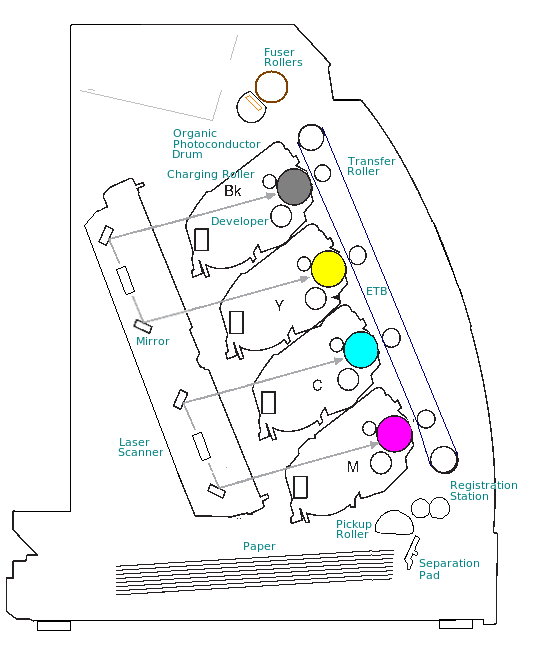
The machine's cross-section and principles of operation show some resemblance to HPs successful CLJ_2700/3000/3600/3800 andCP3505series; the 2600 series is a downsized version of the same thing.
However the 2605 seems to have reached the limits for this design; successors like the CP1210 and CP2025 use a completely redesigned engine.
The Lexmark C530dn was the other low cost colour printer with a duplex option.
CLJ 2605 fixes a problem with the very similar 2600N. The earlier printer only had 16MB of memory which wasn't always sufficient for rasterising a complex page. This printer has 64MB which almost invariably will be sufficient and the memory is expandable if there is a problem.
Performance is quite good but this design has been discontinued. Research via Google in July 2009 suggested that although quite a lot of sites listed this printer at prices around £200 only a couple claimed to have stock. In 2012 HP reckon they can legitimately withdraw spares. The newer CP1210 series has similar performance and price; the only sting being that the newer cartridges are smaller (1400 pages instead of 2,000 for colours).
Service parts to keep these printers going are currently available. As always at the low end of the market there is that repair or replace
question.
In performance terms, newer printers probably won't give anything better although photos might improve a bit. If you are in the habit of using HP original cartridges newer printers will raise the cost per page a bit by using smaller cartridges. If you use refilled cartridges then they are probably easier to obtain (and cheaper) for these older printers (and presumably you aren't too concerned about photo quality).

These printers are more difficult to service than some other machines. The design aim seems to have been low manufacturing cost, not easy service. Changing the fuser and ETB both require removing the covers and changing a couple of plugs, they do not simply plug in as they do on bigger printers like the CLJ 3600. The job isn't arduous, but it does mean removing screws and exposing circuits that can carry high voltages, as does any electrical repair work.
Working printers seem to have kept their price quite well. A quick examination of eBay in 2012 suggested prices for the simplex model between £119 and £159 with 90 day warranty. Obviously there is no guarantee of the longevity of transfer belt and fuser with that. The fact that the second-hand price has held up generally suggests these printers are worth repairing.
Colour:
Colour print first becam commonplace with inkjet printers in the early 1990s, matching the growing interest in digital photography. It is relatively easy to make a colour inkjet, just add three extra cartridges to the carriage. Colour laser print is rather more difficult because the three extra mechanisms each comprise half a dozen precision aligned rollers. The HP Colour Laserjet 2600 series was one of the first print-engines to provide this at a low cost point where machines could give credible competition to inkjets.

Control:
LCD Display with 2 lines of 16 characters. 2 LEDS - attention and Ready. 4 Buttons for Job Cancel, Left and Right Menu and option Select.
Duty Cycle:
The specification says the printer is rated for up to 35,000 pages per month. In reality use will be limited by small consumables. Colour cartridges hold toner for 2,000 pages and if you regularly exceed that the much bigger cartridges on something like the LJ 4600 or LJ 5500 would be much better value. For a little printer, however, the LaserJet 2600 family have proved quite robust. Some known problems are mentioned below.
Print Speed:
12 pages per minute black.
10ppm colour.
First Page Out in 20 seconds thanks to Instant-On technology. The CLJ 2605 has a fairly high print speeds for this generation of machines thanks to the inline print-engine arrangement.
Print Resolution:
Engine resolution is 600x600dpi enhanced to HP ImageRet 2400 print quality. Photographic material might count as "magazine" quality - not perfect but acceptable for most purposes. One of the more recent printers like the CP2025 with ImageRet 3600 has an improved software algorithm and will perform better. If you want photography get an injet designed for the job and use special paper.
Paper Handling:
A4 etc, single sheet input slot and one built in tray with the option for another
The single-sheet slot is unusual on HP printers (it is sometimes called a bypass slot) and takes the place of tray 1. A sheet of paper or envelope placed in the slot goes straight to the registration rollers - there is no feed roller for this slot.

Tray 2 is a cassette built in to the base of the printer (the single-sheet slot is in the front) There is the usual pickup roller and pad arrangement.
Tray 3 is optional and was normally bought at purchase by buying the DTN
model of the printer. It fits underneath.
This printer was unusual at the time in having a Duplex capacity (automatic double-sided print) on the DN
and DTN
models at a very affordable price. Duplex is not available as a retrofit option, the fuser and ETB would have to be changed, the duplex drive assembly would need to be added and the cartridge access door changed - even if it's possible it's not feasible.
- Media Sizes:from 3x5 to 8.5x14 inches.
- Input Capacity:Tray 1, 2 and 3 media sizes: 176 x 250 mm (B5) to 210 x 297 mm (A4). Media weight 60 to 105 g/m².

Processor:
300MHz Freescale Coldfire V5e processor.
Memory:
64MB memory which HPs publicity information says is sufficient to handle complex print jobs.
Memory expandable to 320MB by changing 100 pin DIMM.
Interface:
USB 2.0
Network:
Network models available - DN and DTN
There is no wireless model available. (If you want to print from a wireless notebook connect the printer to the router, ideally at a static address).
System Compatibility:
Microsoft Windows 2000, XP, Vista.
Apple Mac 0S X v 10.2.8 and higher
Linux drivers work using CUPS or HPLIP and with the PostScript support there should be no issue with any other Unix or PostScript capable operating system.
Print Languages:
HP PCL 5e, HP PCL6, HP PostScript Level 3 emulation.

Dimensions:
407 x 453 x 373 mm for the base unit.
At least 50mm or 2 inch clearance is required all round.
Consumables:
The CLJ 1600, 2600N and 2605DN and DTN all take the same print cartridges, however they use different transfer belts (ETBs) and fusers.
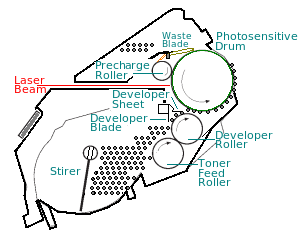
As usual with colour laser printers the machine takes Cyan, Magenta, Yellow and Black print cartridges (CMYK printing). Like most HP printers this model has the toner, developer, drum and waste receptacle built into one unit, minimising the inconvenience of changing consumables. If HP cartridges are used then HP SureSupply
alerts are given when cartridge is low, and this can be extended to online cartridge ordering. Non - HP cartridges (refills or compatibles) may lack chips to do this and may not be able to give the SureSupply information.
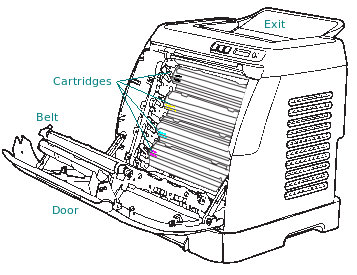
HP provide a clear outline of how to change the cartridges in the user manual and online. However its simply:
- Unwrap the replacement cartridge and check that it is the correct type.
- Fold down the front door and the transfer belt.
- Pull the used cartridges forward by the handles at their sides and place them in the wrapper the replacement came in.
- Place the new cartridge in the slot
- Close the transfer belt and door.
When the printer sees the door close the motors will come to life as it tests the situation.
Q6000A, Black Print Cartridge for CLJ 1600/ 2600/CM1015. 2500 pages at 5% - Q6000A 
Q6001A, Cyan Print Cartridge for CLJ 1600/ 2600/CM1015. 2000 pages at 5% - Q6001A
Q6003A, Magenta Print Cartridge for CLJ 1600/ 2600/CM1015. 2000 pages at 5% - Q6003A
Q6002A, Yellow Print Cartridge for CLJ 1600/ 2600/CM1015. 2000 pages at 5% - Q6002A
Q6000AD, Black double pack- 2x2,500 cartridges - Q6000AD
Cartridges are arranged in a stack against the transfer belt. In operation the belt carries a page across the cartridges, one after another and the voltage on each, and on the transfer rollers behind the belt vary as the image is built up. At the top of the printer the page exits through the fuser where heat and pressure make the toner adhere.
Refill and Recycling
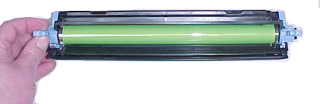
Canon and HP made these print cartridges to be small, efficient and easy to change. They also made them deliberately difficult to refill. Uninet and Static Control both remark on the problems in their re-manufacturing guides - which are 30 pages long - search for Static Control's document SSS-771
or Uninet HP LaserJet 2600 ⢠Toner Cartridge Remanufacturing Instructions
.
Remanufacturing problems have largely been overcome and such cartridges are readily available.
Some businesses and charities collect used cartridges typically for about £1-2 per unit in good condition. For commercial recycling they want quantities of ten or more in good condition, hence its a good idea to put the used ones back in the box - your chosen charity will get a better price.
In some countries HP will also collect used cartridges for recycling. Their process is rather different, they dismantle the cartridge and recycle the materials as plastics and metals rather than as complete units or components.
Printer manufacturers dislike recycled or remanufactured cartridges. Reasons are obvious; the price of this printer was about £200 - the price of a complete set of HP original cartridges is higher. That is not unusual with low cost printers; the manufacturer expects to make a profit from sale of cartridges. Any other source of cartridges spoils that plan.
Re-manufacturing is a broad term. A mere refil might count; a used cartridge often has a lot of further life left in the drum, developer, precharge roller, waste scraper blade and other parts. After a refill those parts will be less viable so now the term re-manufacturing becomes meaningful; the cartridge is split and parts replaced. Manufacturers can't simply clone
a new cartridge because Canon and HP have their designs guarded by copyright, trademark and patents. So re-manufacturers for the various components, toners, OPC drum, charge drums, developer sheet and chip aim to produce the components without running into legal issues.
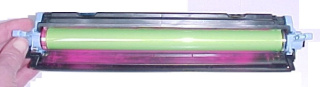
Remanufactured cartridges can be less than half the price of manufacturers originals. Remanufacturers have greater technical difficulties, higher costs and a smaller market share than Canon and HP. A typical problem is that the SureSupply information doesn't work, or isn't complete. Remanufactured cartridges are often recognisable in a machine, the cartridge doors will have a build-up of lose toner caused by poor electrostatics. Printed image quality and reliability are likely to be lower as well.
Users of these printers tend to be rather cost conscious, so the availability of low-priced compatible cartridges is often a conclusive argument. There are at least a dozen brands of remanufactured cartridge for the Color LaserJet 2600 series. Which is best
is an unanswerable question. A mere refill can work very well - once. A complete remanufacture should work well, but a warped plastic part could cause a leak that will make a mess of the printer - transfer belts can be badly effected. All remanufacturers will have a return rate due to random misjudgements but aren't likely to give straight answers when asked about it. These printer will generally be out of warranty so it is for the user to decide.
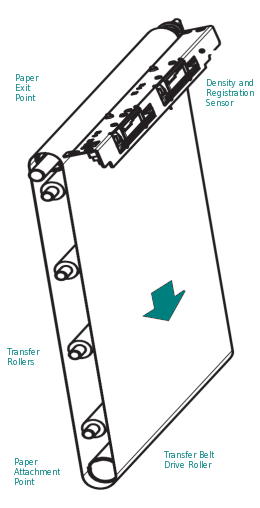
Belt:
An Electrostatic Transfer Belt (ETB) is used as part of the imaging process, acting as both a transporter for the paper and an electrically active surface for the toner to cling too as it passes over the transfer rollers.
The ETB lasts through several changes of toner, probably about 10 sets of cartridges. There doesn't seem to be an HP/Canon official statement on belt life. Experience with other printers is that page-yield for a belt printing black only is about 100,000 pages at 5% colour and in 4 colour that might fall to 25,000 pages. Start-stop printing - lots of single pages- will definitely shorten the belt life. Continual printing where the machine is able to start another page as soon as it finishes the last may give a longer life (Some HP Manuals mention this pattern).
- RM1-1891(Simplex) Laserjet 2605 Transfer Belt (ETB) Assy

- RM1-1892HP Laserjet 2605D/N (Duplex) Electrostatic Transfer Belt (ETB Assy)
There are two kinds of ETB because the duplex path is down the back of the transfer belt and has an extra motor to push the paper down, round and into the registration station. The duplex ETB therefore carries this extra bit of mechanism. It may be possible to buy a simplex ETB and transfer the motor, covers and other parts from an old ETB onto the new one but that will breach the warranty on the new part.
The ETB can be dismantled and cleaned up - the Density and registration sensor can get contaminated with toner powder if there is a rogue cartridge in use. Although some people claim to have refurbished belts we don't currently know (July 2012) of a reliable supply.
Changing The ETB
Note that replacing the ETB requires unplugging the printer and removing the top and side covers. Circuits that can carry hazardous voltages are exposed. The printer must be unplugged before work starts. Also note that the printers own cicuits are vulnerable to static electricity - take anti-static precautions.
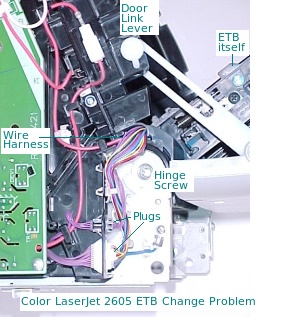
Briefly: Details here
- Pull the paper cassette right out of the machine
- Remove two screws from the right side cover
- Remove one screw from the left side cover
- Open the front door
- Remove the right side by twisting the front edge of the cover outward, there is a tab about halfway up that needs to release.
- Remove the left cover, there is a tab on the lower front corner that needs to be released.
- Squeeze the white plastic left hand side door link-lever to release it
- Remove the screw from the plastic catch on the right side
- Close the ETB, but leave the door open.
- Remove the cable connectors from the ETB to the chassis and undo the grounding screw
- Pull out the white HT wire from it's connector
- Remove the ETB hinge screws on both sides
- Remove the hinge cams on both sides
- The old ETB should now lift free
- Align the new ETB with its screw holes at the base, taking care to avoid contact with the belt itself.
- Screw in the right side first
- Work back through the steps, remembering to plug the connectors back into the holes they came from. Reassemble the machine before plugging it back in.
The full procedure for both ETB and Fuser can be found in the service manual. Use Google to search for Q7821-90930 or buy a manual from one of the websites specialising in such things.
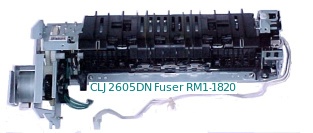
Fuser:
Laser printers make the image on the page from lose toner powder. The fuser in a laser printer adheres the toner powder to the page using a combination of heat and pressure.
The fuser for the CLJ 2605 is located in the top front portion of the printer and to get at it the side panels, top trim and the top of the printer have to be removed. Whilst this is just a screwdriver job the machine must be disconnected from the power outlet and it does require a bit of experience of computer and printer repair. See the CLJ 1600 page for details. Laser-Pros International have a specific note on the 2605 called "HP 2600/2605 Fuser and ETB Installation Instructions"
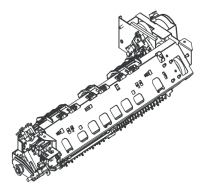
There are two fuser versions depending on whether the printer is a duplex model
- RM1-1829-050CN Simplex version 220V RM1-1829-050CN. Used in the CLJ 2605 Simple Printers Only The fuser has been known as RM1-1829-000CN, RM1-1829-030CN and RM1-1829-050CN.
- RM1-1825 Duplex version 220V RM1-1825-050CN VFor 220 V Operation and Duplex Printers Only. The fuser has been known as RM1-1825-000CN and RM1-1825-050CN
- RM1-1828 The 110 Volt models are the RM1-1824-050CN (Duplex Printers) and RM1-1828 (Simplex Printers). At the moment those fusers aren't available in the UK and will only be available on special order -email to ask.
As usual there is a different model of fuser for the American market where 110 volt power supplies are normal.
Spares:
The general construction of the printer is similar to that of the CLJ 1600 and CLJ 2600 and many of the parts are common.
The drop-down multipurpose tray which is normally tray-1 on an HP laser printer is not present, just a single sheet bypass slot feeding paper straight into the registration rollers. The only roller and pad are for the cassettes (they fit both tray 2 and the optional tray 3) .
RM1-1922 Separation Pad for tray 2 & 3 CLJ 1600/ 2600/ 2605/ CM1015/ CM1017MFP - RM1-1922-000CN
RC1-5440 Tray 2 & 3 Pickup Roller D-shaped Roller for CLJ 1600/ 2600N/ CM1015/ CM1017MFP (clips onto a holder on the shaft) - RC1-5440-000CN
RM1-3423, DC Controller for CLJ 2605. Was RM1-3423-000CN now RM1-3423-020CN
RM1-1978 High Voltage PSU for the HP Color Laserjet 2600N, RM1-1978-000CN, (code not recognised by HP)
RM1-1976, DC Power Supply for the HP Color Laserjet 2600N, RM1-1976-000CN (code recognised but no information)
RM1-1983, Control Panel for LaserJet 1600/2600N (not 2605) was RM1-1983-000 now - RM1-1983-050CN
RM1-1945, Cassette tray 3 (250 sheets) for CLJ 1600/ 2600N/ CM1017MFP -(2605 not mentioned) RM1-1945-080CN
RM1-1925, Cassette Tray for 250 sheets) for CLJ 1600/ 2600N/ 2605/ 2605DN/ CM1015MFP/ CM1017MFP - RM1-1925-000CN
RM1-1859, Output Tray Extender / delivery tray for CLJ 1600/ 2600N/ 2605, RM1-1859-020CN
Also note
RM1-5181 Laser Scanner Assembly for the HP Color Laserjet 1600/2600/1015 was RM1-1970-000CN now - RM1-5181 The price of this laser scanner is nearly as high as that of the printer - so its not likely to sell.
A Separation pad and pickup rollers Q5956-67902 is listed by some sources - it seems to be a myth.
Options and Accessories:
HP 250-sheet Paper Tray for the CLJ 1600, 2600N, CM1015MFP and CM1017MFP ( not applicable for 2605dtn which has the tray in the pack) - Q6459A
Copyright G & J Huskinson & MindMachine Associates Ltd 2013, 2015. Some pictures derived from HP User and Service guides. These technical pages do not constitute an offer for sale; just our knowledge at the time of writing. See the catalog. Sales pages on this Web site use cookies to store user information. We also use Google Analytics to track site usage patterns.